Free while in beta

Every hour accounted for,
without the busywork.

TaskBraid is a time tracker for people running several things at once. Tap a card to start, keep your notes right next to the clock, and end the week with a timesheet you can hand over as it is.

  • One tap to start or stop
  • Notes beside the clock
  • Timesheet-ready decimal hours
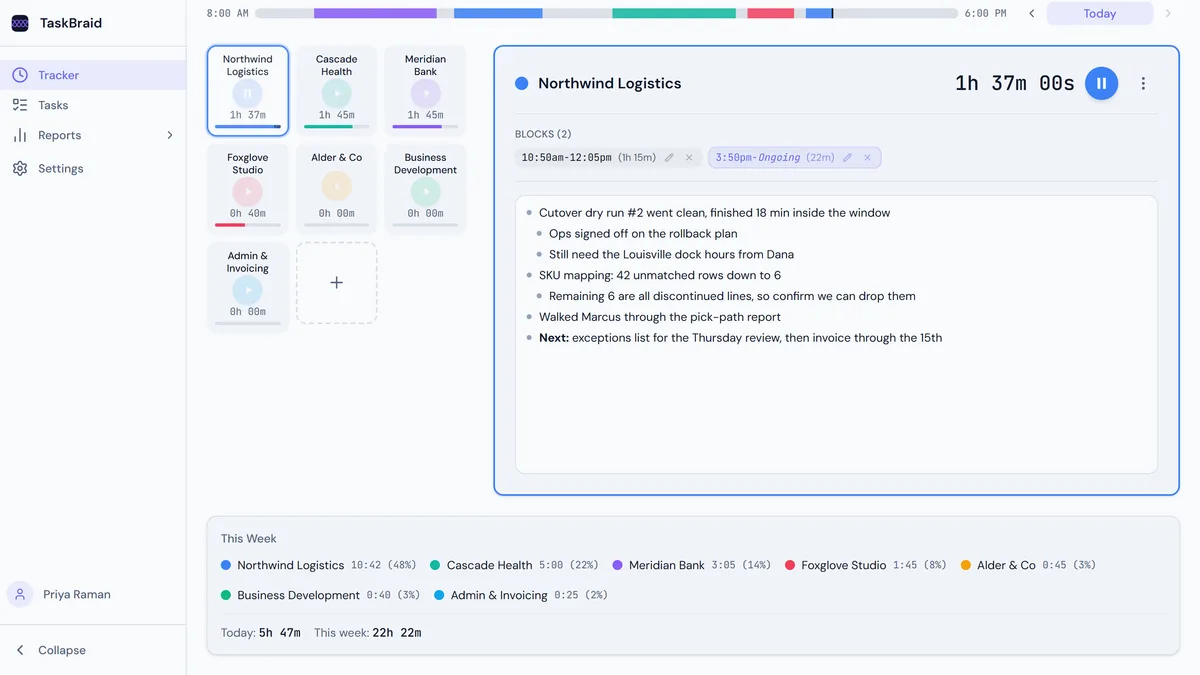
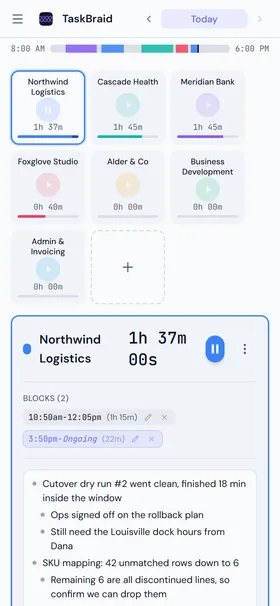
TaskBraid on a phone: the day timeline, a grid of task cards, and the selected task's time blocks and notes.

An actual screen from the app. Every screenshot on this page is, with sample data.

Features

Built around the way the day actually goes.

Tracking only survives if it takes seconds. Everything here exists to keep the overhead near zero and still give you numbers worth billing from.

  1. 01

    Start with one tap

    Tap a task card to start the clock and stop whatever was running. Hold it, or use a modifier click, to run two things at once when a call overlaps real work.

  2. 02

    The whole day in one bar

    A colour-coded timeline sits above your tasks, spanning the hours you actually work. Gaps and context switches are obvious at a glance.

  3. 03

    Notes attached to the hours

    Every task has an outline editor for that day. Nested bullets, bold and links, written where you are already looking rather than in a separate app.

  4. 04

    Weekly goals that adapt

    Set hours per week per task. TaskBraid spreads what is left across the weekdays you have not worked yet, so a slow Monday reshapes the rest of the week.

  5. 05

    A timesheet you can hand over

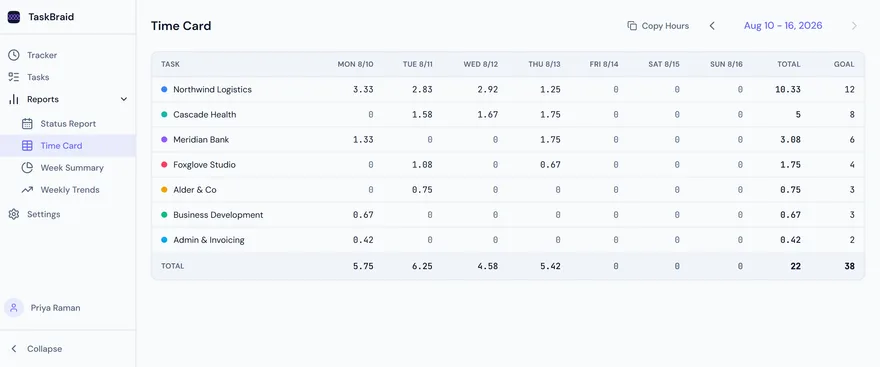
    The Time Card is a task-by-day grid in decimal hours, with totals and goals. Copy Hours puts the whole table on your clipboard for a spreadsheet, chat or email.

  6. 06

    Reports that answer real questions

    Goal progress and goal-versus-actual for the week, stacked trends over 4 to 26 weeks, and a status report that pulls your notes together day by day.

  • Edit or add blocks after the fact
  • Configurable day boundary, 4am by default
  • Light, dark and system themes
  • Synced across your devices
  • Installs as a desktop app
  • Export and import your data

The tour

Track on Monday. Report on Friday.

The tracker is where you spend seconds a day. The reports are what those seconds buy you at the end of the week.

01 Time Card

The week as a grid, in decimal hours

Tasks down the side, days across the top, totals in both directions. Goals sit in the last column so you can see the gap while there is still time to close it.

  • Decimal hours (1.75, not 1h 45m), the format timesheets want
  • Copy Hours puts the table on your clipboard, formatting intact
  • Click any goal cell to change it for that week only
app.taskbraid.com
The Time Card report: seven client rows across Monday to Sunday in decimal hours, with per-day, total and goal columns.
02 Status Report

Your notes, already written up

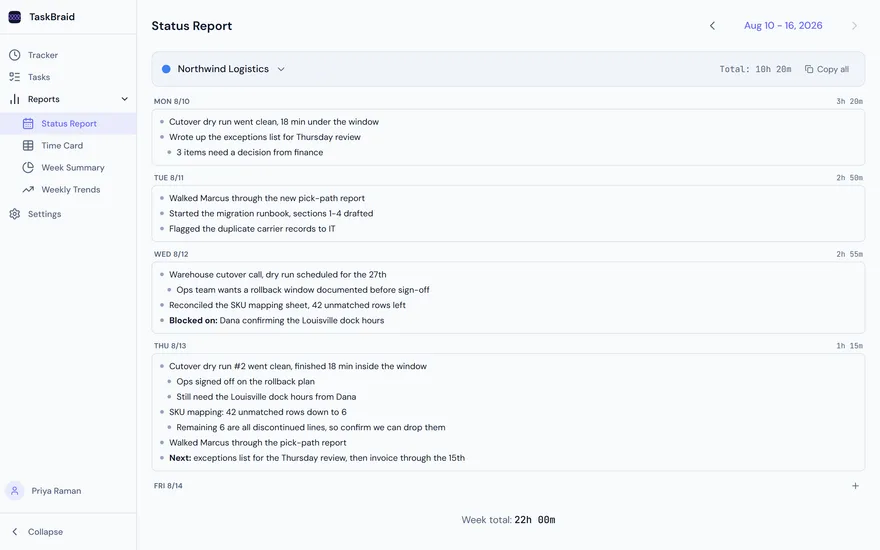
Pick a task and every note you wrote for it that week lines up by day, with the hours next to each one. The weekly update is mostly done before you start writing it.

  • One task at a time, day by day, with hours per day
  • Notes stay editable right here, with no jumping back to the tracker
  • Copy any day as markdown for email, chat or a doc
app.taskbraid.com
The Status Report: Northwind Logistics notes grouped under Monday through Thursday, each with the hours logged that day.
03 Week Summary

Where the week landed against plan

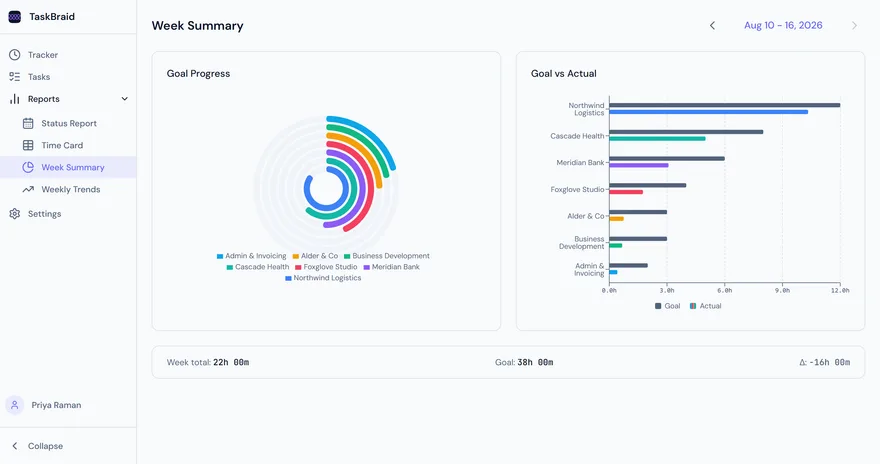
Goal progress as a ring per task, goal versus actual side by side, and a single line telling you how far over or under the week came in.

  • Per-task rings show how much of each goal you have hit
  • Paired bars make the over- and under-served work obvious
  • Week total, goal total and the delta between them
app.taskbraid.com
The Week Summary report: a radial goal-progress chart beside a goal-versus-actual bar chart, with week total, goal and delta beneath.
04 Weekly Trends

Whether this week was normal

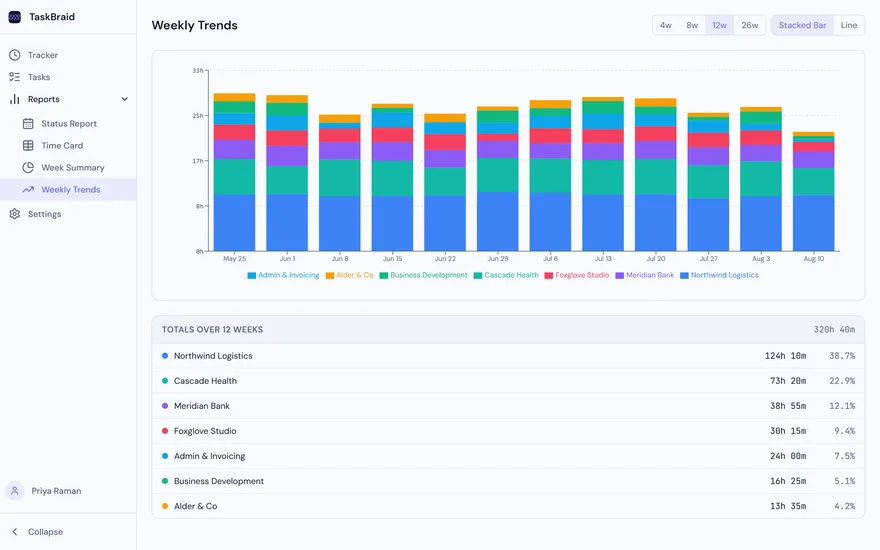
Stack up 4, 8, 12 or 26 weeks and the shape of your workload shows up: the client that keeps growing, the one quietly eating your Fridays.

  • Stacked bars or lines, over four window lengths
  • Totals and share-of-time per task across the range
  • Built from the same blocks you already logged
app.taskbraid.com
The Weekly Trends report: twelve weeks of stacked bars by client, with a totals table showing hours and percentage share.
05 Tasks

Set it up once and forget it

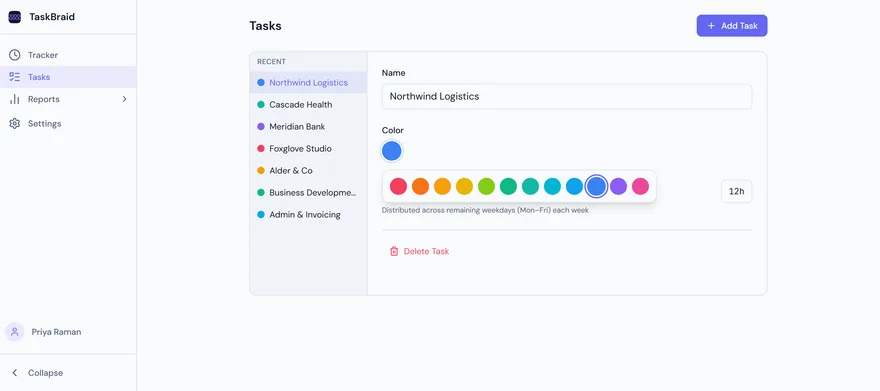
A task is a name, a colour and a weekly goal. Twelve colours, chosen to stay distinguishable in both themes, because the colour is how you read the timeline.

  • Rename, recolour or retire a task without losing its history
  • Weekly goal per task, spread across your weekdays
  • Deleted tasks are archived, not erased, so you can restore any time
app.taskbraid.com
The Tasks screen: a list of clients on the left and, on the right, the selected task with its name, the twelve-colour palette open, and its weekly goal.

Who it is for

Anyone with more going on than one thing.

TaskBraid does not care whether the hours are billable. It cares that you know where they went.

The consultant

Five clients, one honest invoice

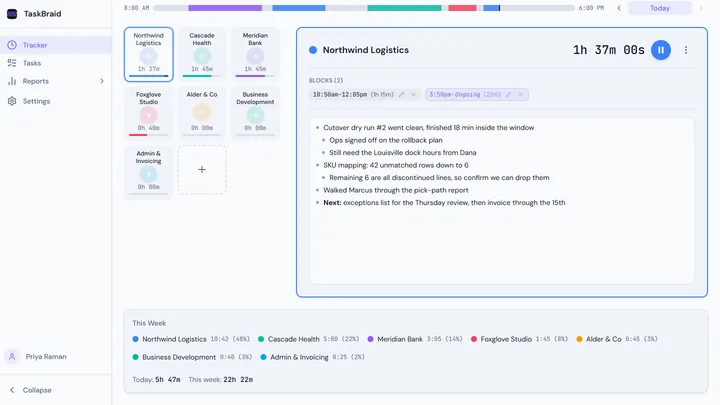
A card per client, a weekly goal per retainer, and notes that turn into the status update you owe on Friday. When a client asks what the 10.3 hours went on, the answer is already written down.

tasks on the board
7 tasks on the board
weekly goal
38h weekly goal
to copy the timesheet
1 click to copy the timesheet
app.taskbraid.com
A consultant's tracker: seven client cards, a running timer on Northwind Logistics, and that day's notes beside it.

The parent

Training, dinner, homework, repeat

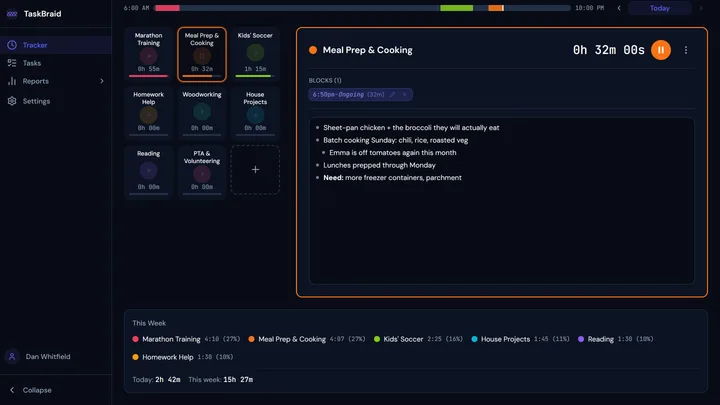
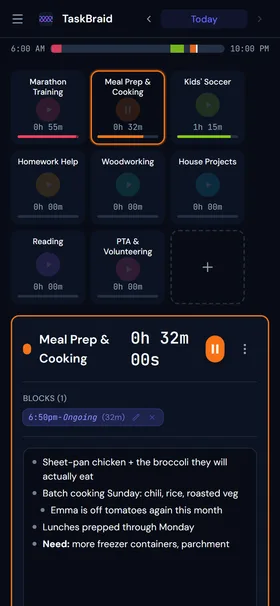
Not everything worth protecting is billable. Give the marathon plan, the workshop and the reading hour the same weekly goals you would give a client, and find out which one keeps losing.

things worth protecting
8 things worth protecting
day window
6am to 10pm day window
theme, for evenings
Dark theme, for evenings
app.taskbraid.com
A parent's tracker in dark mode: cards for training, cooking, soccer, homework and hobbies, with a timer running on meal prep.

Model Context Protocol

Let your AI assistant keep the clock.

TaskBraid ships a remote MCP server, so Claude and other spec-compliant clients can read your time and log it for you, using the same reads and writes the app does, scoped to your account.

connect once
$ claude mcp add --transport http taskbraid \
    https://app.taskbraid.com/mcp

Or add it as a custom connector in Claude Desktop. Either way you sign in the normal way and approve the connection in the browser.

Then just ask

  • “What did I work on this week?”
  • “Start a timer on Cascade Health”
  • “Log 90 minutes to Meridian yesterday afternoon”
  • “Add a note to Northwind: cutover signed off”

Reads

list_tasksget_dayget_summaryget_running_timersget_settings

Writes

start_timerstop_timerlog_timeedit_time_blockset_notescreate_task

OAuth 2.1 with PKCE, scoped to you. Deleting tasks and changing your settings are deliberately left out of the toolset.
TaskBraid on a phone in dark mode: the day timeline, a grid of task cards, and the selected task's blocks and notes.

Same account on your phone, installable as an app

Plans

Free to start, no card required.

Sign up and track today. Paid plans are not ready yet, so nothing is behind a paywall except the length of history you keep.

Free

01

Available now

$0

Everything in the tour, with a rolling 60 days of history.

  • Unlimited tasks and time blocks
  • All four weekly reports
  • Notes, weekly goals and sync
  • Export your data at any time
  • 60 days of history
Start tracking, free

Pro

02

Not yet available

Coming soon

The same product, with your full history kept indefinitely.

  • Everything in Free
  • Unlimited history, nothing expires

Coming soon

Max

03

Not yet available

Coming soon

Unlimited history plus the AI features as they land.

  • Everything in Pro
  • AI features as they ship

Coming soon

Free accounts keep a rolling 60 days of time entries. Older entries are removed, so export anything you want to keep. Pro and Max will lift that limit when they launch.

How it works

Three habits, and that is the whole thing.

  1. 01

    Name the things you want back

    Clients, projects, the marathon plan. Give each one a colour and, if it matters, an hours-per-week goal.

  2. 02

    Tap when you switch

    Starting one task stops the last one, so the day builds itself. Forgot to stop? Drag the block to the right time afterwards.

  3. 03

    Take the week off the shelf

    Friday, open the Time Card, hit Copy Hours, paste. The status report is already written from the notes you took along the way.

Know where the week went,
while it is still going.

Start tracking, free Free plan, no card required

What it deliberately is not

  • No screenshots, no keystroke counting, no surveillance
  • No kanban boards, sprints or subtasks
  • No invoicing engine. Your hours, your tool of choice